Clipping Masks, Photo Frames, and Overlays: A Practical Guide for Creative Projects
When it comes to enhancing digital images, the right tools can make a significant difference in the final output. Clipping masks, photo frames, and overlays are among the most versatile tools available for designers, photographers, and artists. These elements allow for creative customization without altering the original image, making them ideal for various applications such as scrapbooking, graphic design, and social media content creation.
Understanding Clipping Masks, Photo Frames, and Overlays
A clipping mask is a technique used in graphic design software like Photoshop or GIMP to apply one layer’s transparency to another. This allows you to use an image as a mask for another element, effectively revealing only the parts of the underlying layer that match the shape of the top layer. This method is particularly useful when you want to place text or graphics within the contours of an image without affecting its integrity.
Photo frames are pre-designed borders that surround an image, adding visual interest and context. They come in various styles, from simple lines to intricate patterns, and can be customized with different colors, textures, and effects. When combined with clipping masks, they offer even more flexibility in how images are presented.
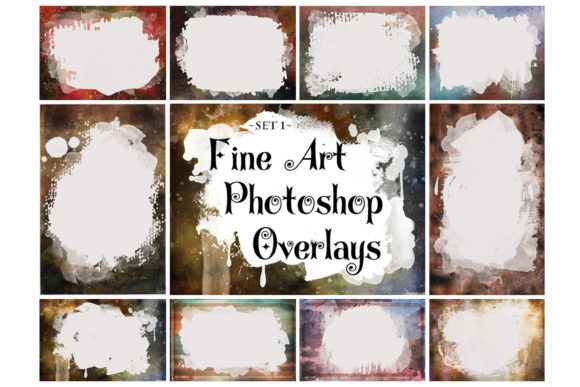
Overlays, on the other hand, are semi-transparent layers that add texture, color, or effects to an image. They can be used to create vintage looks, add depth, or enhance the mood of a photograph. Unlike clipping masks, which define the visible area of an image, overlays modify the appearance of the entire image or specific parts of it.
Why Choose Clipping Masks, Photo Frames, and Overlays?
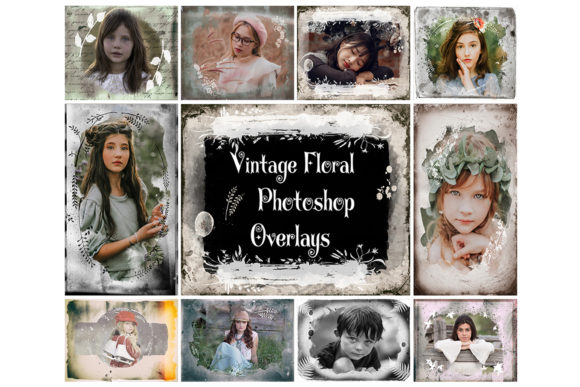
The combination of clipping masks, photo frames, and overlays provides a powerful way to transform images while maintaining their original quality. For instance, using a vintage floral frame overlay with a transparent area allows the main image to remain visible while adding a decorative border. This approach is especially effective for creating nostalgic or artistic effects without the need for complex editing techniques.
These tools are compatible with a wide range of software, including Photoshop, Photoshop Elements, GIMP, and Paint Shop Pro. Their versatility makes them suitable for both beginners and professionals who want to experiment with different styles and effects. The high-resolution PNG files (300 dpi, up to 4000x6000 pixels) ensure that the overlays maintain clarity even when scaled up for large prints or digital displays.
Comparing Alternatives and Use Cases
While clipping masks, photo frames, and overlays are highly effective, they may not always be the best choice depending on the project requirements. For example, if you're working on a minimalist design where simplicity is key, using too many overlays might overwhelm the composition. In such cases, a clean photo frame or subtle clipping mask could be more appropriate.
Another alternative is using vector-based frames or illustrations, which can be scaled without losing quality. However, these may not offer the same level of texture and detail that PNG overlays provide. Similarly, using filters or presets in photo editing software can achieve similar effects but may lack the customization options offered by manual layering with clipping masks and overlays.
For those who prefer a more hands-on approach, creating custom frames and overlays from scratch can be rewarding. However, this process requires advanced skills in graphic design and may be time-consuming. Pre-made overlays and frames offer a quicker solution for those looking to produce professional-quality results without extensive technical knowledge.
Best-Fit Situations and Limitations
Clipping masks, photo frames, and overlays are best suited for projects that require visual enhancement without compromising the original image. They are particularly useful in photography, where the goal is to highlight the subject while adding artistic flair. For example, a vintage floral frame overlay can be used to give a modern photograph a classic feel, making it ideal for wedding invitations, scrapbook pages, or social media posts.
However, there are limitations to consider. Since these tools rely on layering and transparency, they may not be suitable for all types of images. Highly detailed or low-contrast images may not respond well to overlays, and improper use can lead to unintended effects. Additionally, the effectiveness of these tools depends on the software being used; some programs may have limited support for advanced layering features.
It's also important to note that the files provided are digital and cannot be shared or sold as-is. Users must respect the licensing agreements and ensure that the overlays are used for personal or commercial purposes as permitted by the provider. Colors may vary slightly depending on the monitor or printer used, so it's advisable to review the final output before printing.
Practical Examples and Tips
To get started with clipping masks, photo frames, and overlays, follow these steps:
- Open your image in a program that supports layers, such as Photoshop or GIMP.
- Create a new layer above the image and add the desired overlay file (e.g., a vintage floral frame).
- Adjust the transparency and color of the overlay to blend it with the background image.
- Use clipping masks to define the areas where the overlay should appear.
- Experiment with multiple overlays to create layered effects.
For best results, start with a simple overlay and gradually build complexity. Avoid overusing effects, as this can detract from the overall composition. Also, consider the purpose of the project—some designs may benefit from bold, dramatic overlays, while others may require a more subtle approach.
When selecting overlays, look for ones that complement the subject matter of the image. For example, a floral overlay might work well with a portrait or nature scene, while a geometric pattern could enhance a modern product shot. Always test the overlay on a sample image before applying it to the final piece.
By understanding the strengths and limitations of clipping masks, photo frames, and overlays, you can make informed decisions about which tools to use for your projects. Whether you're a professional designer or a hobbyist, these techniques offer a flexible and creative way to enhance your digital images.